

- Enqueue a stack the way you enqueue any Pull Request: through the chrome extension, one /trunk merge comment, or a label on the Pull Request.
- Enqueue the whole stack, or a subset as they get reviewed: the Pull Request you enqueue and everything below it merge together. GitHub automatically rebases the rest of the stack.
- Test and merge a stack atomically: the queue runs a single round of CI covering the entire stack, then merges every Pull Request in one atomic operation.

How it works
Given a stack like: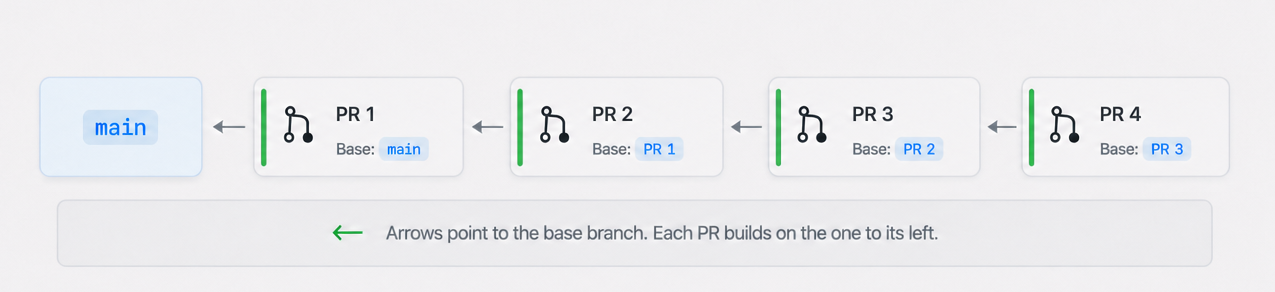
Tracking a Stack in the Queue
When you submit a stack the entry in the Merge Queue UI will reflect all the pull requests that are being tested collectively as seen below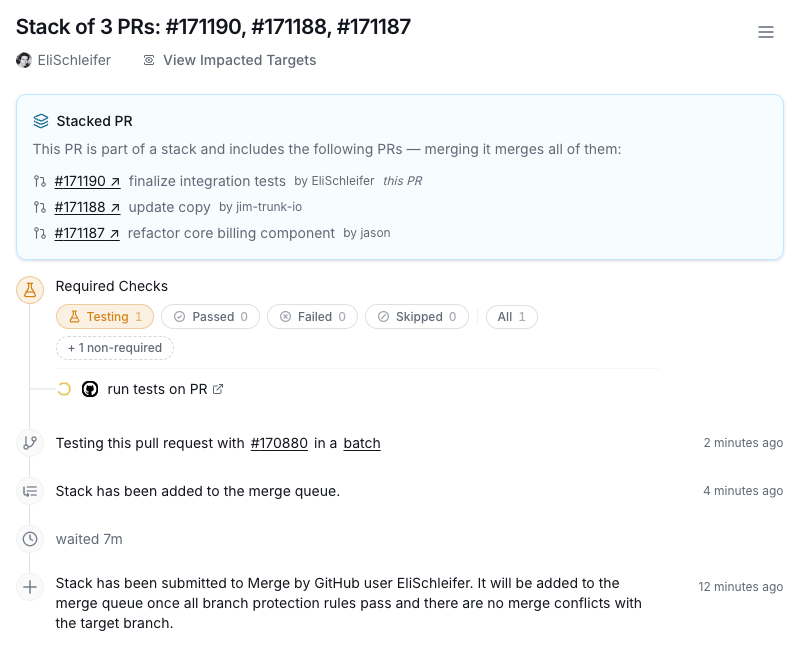
Performance
Because the Trunk Merge Queue is stack aware you will achieve CI performance savings and throughput wins when submitting stacks as we will test the stack of PRs as a single block instead of testing each PR in the stack individually.Things to know
- GitHub may not always rebase after a mid-stack merge. There are some existing issues from GitHub surrounding stacks when performing a mid-stack merge. While GitHub is intending to always rebase stacks correctly - you may still need to manually rebase the existing pieces of your remaining stack after Merge Queue merges the pieces underneath it. GitHub is working on improving this behavior.
- GitHub’s stack merge API can take 90+ seconds to complete. Stacks may stay in the “merging” state longer than a regular PR while GitHub finishes the merge.